 Expose AI
Real or AI?
Know in seconds.
That profile picture, marketplace listing or viral post — was it made by a machine? Choose a photo, video or screenshot, paste an image or a link, or share it from any app, and Expose AI hands you a verdict with a confidence score in seconds. Analyzed on your phone. Never uploaded.


Likely real
No clear AI signals detected. The marker lands below the shaded zone.
Uncertain
Not enough signal to call it — the app says so instead of guessing.
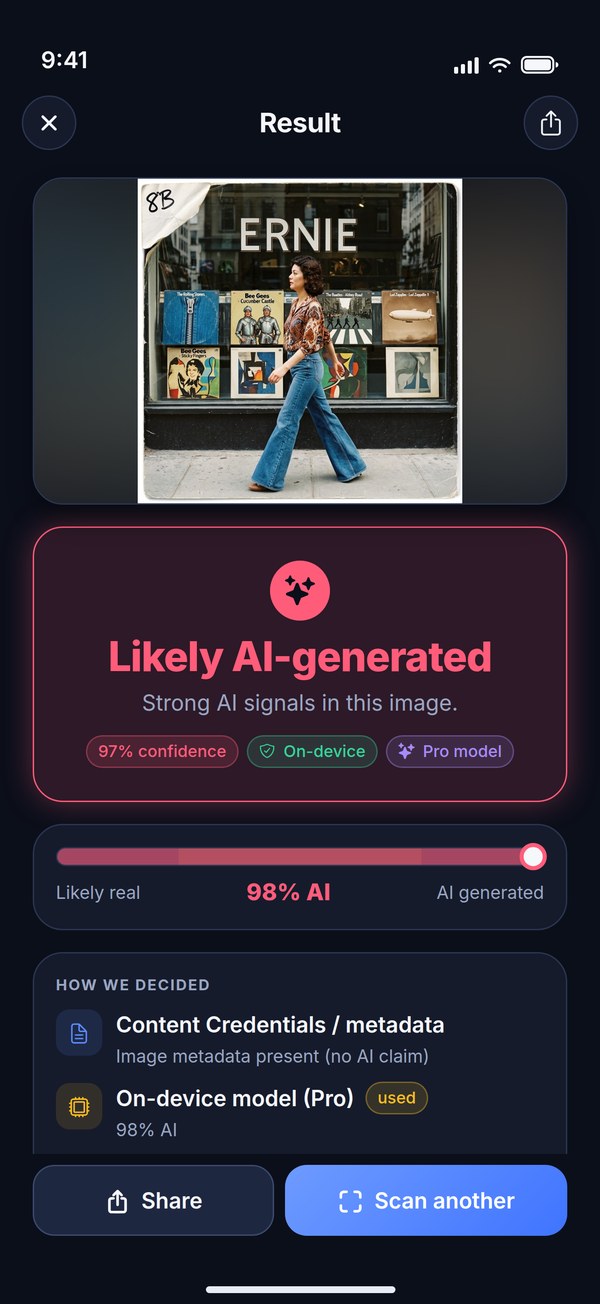
Likely AI-generated
Strong AI signals in this image — from the models, or from the metadata.
Standard or Deep. One verdict. Zero uploads.
Every scan starts with the metadata: a credible AI claim there decides on its own. Everything else — screenshots, stripped files, re-saves, web copies — goes to the models on your phone: one fast model, or two stronger ones in a Deep Scan. Either way, the result screen shows its work.
Pick, paste, share or link
Choose a photo or video, paste an image or a link, share from any app, or check a post, article or image URL. Crop trims a screenshot down to the picture.
Metadata pass
A fast read of embedded Content Credentials (C2PA), XMP and generator tags. An image that declares Firefly, FLUX, Midjourney or Stable Diffusion is flagged on the spot.
Standard or Deep Scan
Standard: one fast model, a single pass, unlimited. Deep Scan: two stronger models over six views each — 12 in all — plus a region scan of nine overlapping areas.
Verdict, with receipts
Likely real, Uncertain or Likely AI-generated on a 0–100% AI gauge, a confidence score, a "How we decided" card naming the signal that made the call — and, after a Deep Scan, the region map.
- Adobe Firefly
- FLUX
- Midjourney
- Stable Diffusion
- DALL·E
- Google Imagen
- Gemini
- Ideogram
- Leonardo.Ai
- NovelAI
- Signed C2PA credentials
Not just whether. Where.
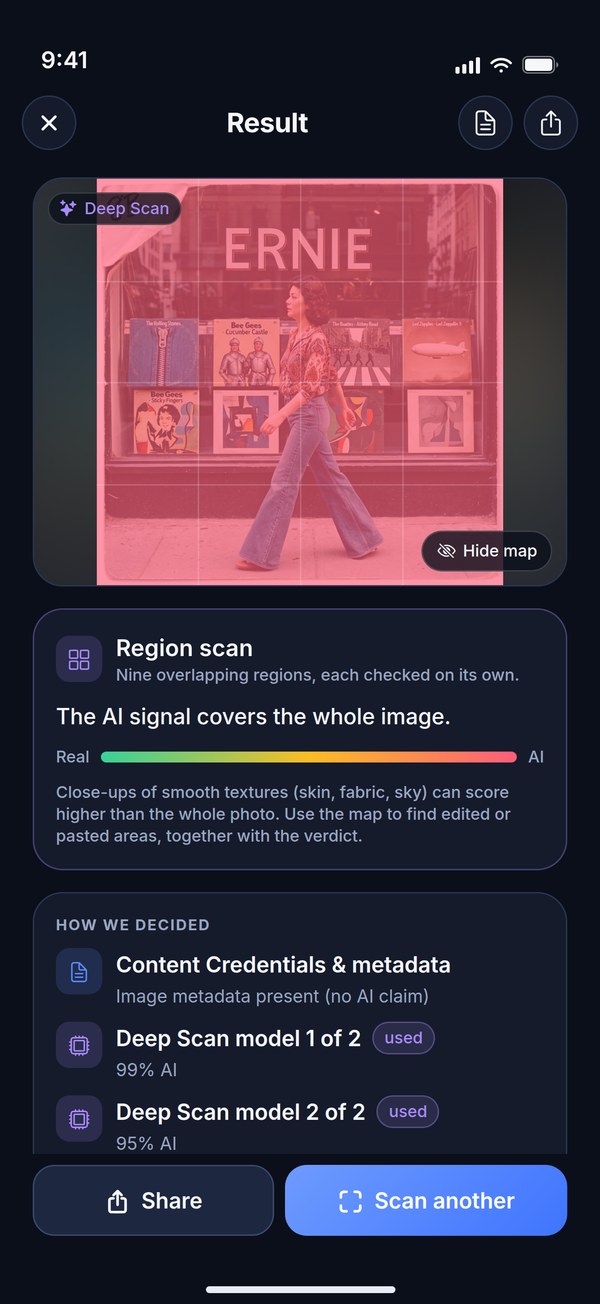
A Deep Scan also splits the picture into nine overlapping regions and checks each one on its own. Tap Show map and a heat map lays over the photo — green, amber, red — so an AI-edited face or a pasted-in object can stand out even when the rest of the picture is real.
- Nine overlapping regions — each checked on its own, summed up in one line under the photo.
- Blended with the whole-image score so one odd patch doesn't light up as a false hot spot.
- Shown with the verdict, never instead of it. Show map lays it over the photo; Hide map takes it off.
- Part of every Deep Scan — free ones included. With Pro, every scan gets one.
The map is an aid, not proof: close-ups of smooth textures — skin, fabric, sky — can score higher than the whole photo. Read it together with the verdict.
Moving pictures? Frame by frame.
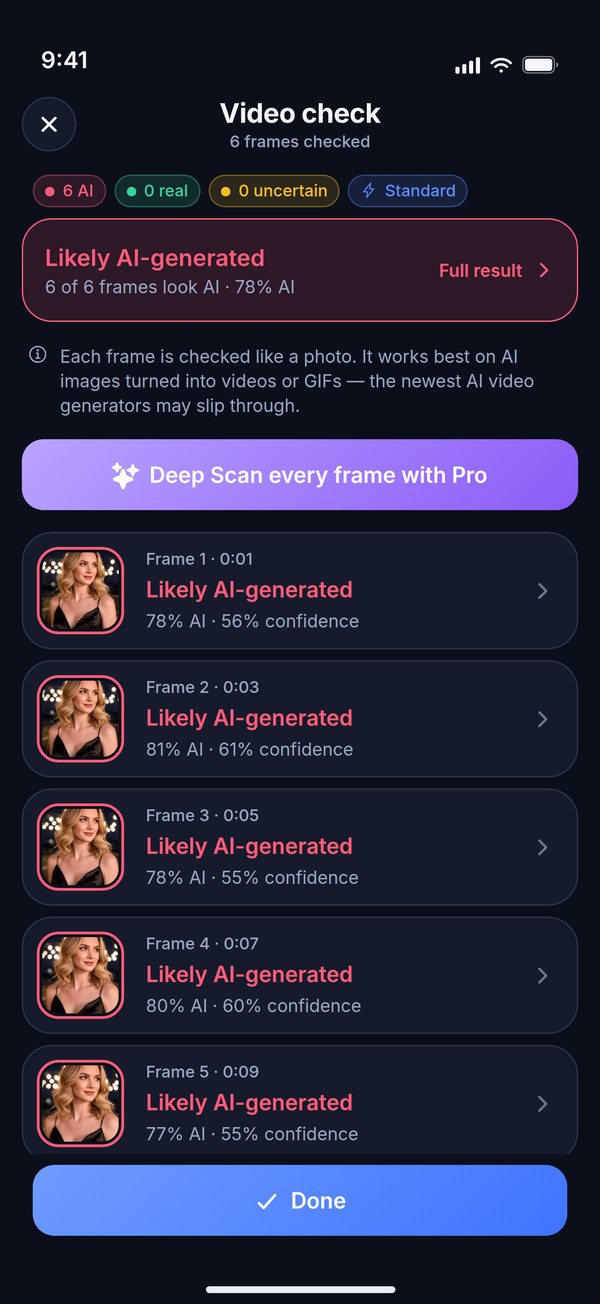
Choose a video, share one from any app, or open an animated GIF. Expose AI takes frames from across the clip — about one every two seconds — checks each one like a photo, and gives you one verdict for the whole clip, with every frame's verdict underneath.
- 4 to 8 frames per clip, checked on your phone — nothing uploaded, even for video.
- One verdict for the clip from the middle of the frame scores, so one odd frame can't swing the call.
- Tap any frame to open its full result: gauge, confidence and how we decided.
- Free: the Standard model on every frame. Pro runs a Deep Scan on every frame.
Frames are judged like photos, so AI images turned into video are caught best — the newest AI video generators can slip through.
Your photos stay on your phone.
The models ship inside the app and run in your phone's memory. There is no server to upload to — so there is nothing for us to see, store or leak. Airplane mode works fine.
No upload, ever
Analysis happens on the device. The app never sends your images to any server — a copy leaves your phone only if you share it yourself.
One image, not your library
The system picker hands the app only the photo you tap, and Paste reads the clipboard only when you tap it. No library permission, no account.
Works offline
Scan with no signal at all. Checking a link is the one exception — your phone fetches it straight from that site, never through us.
See it in your feed? Check it here.
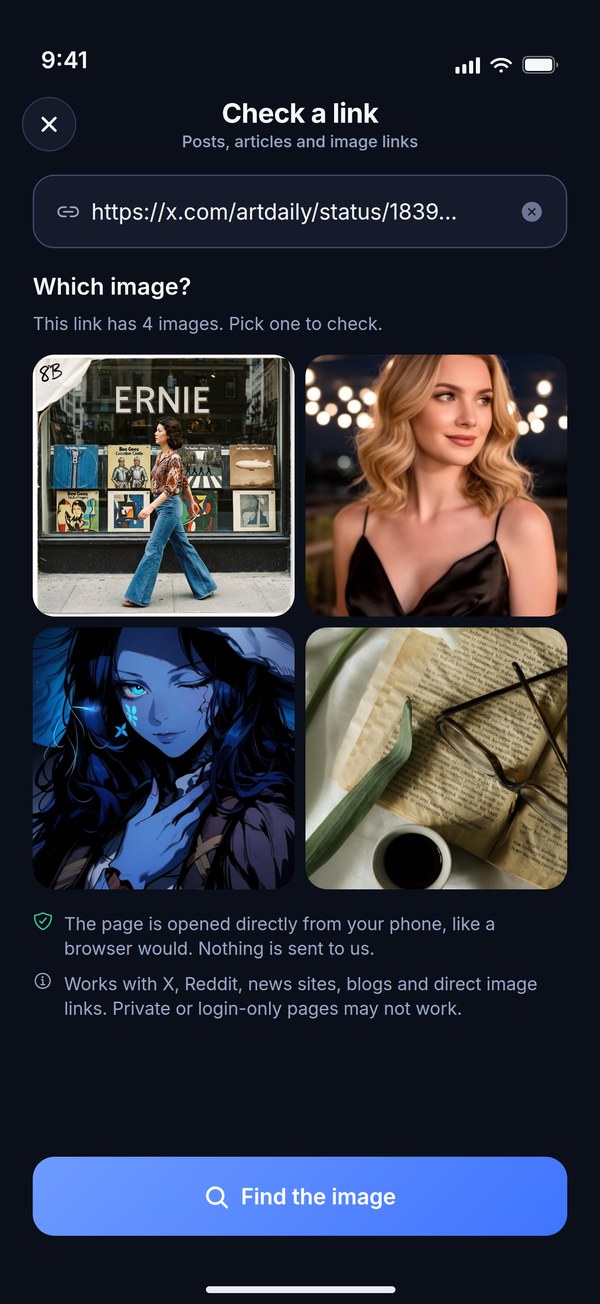
Copy the link to an X post, a Reddit thread, a news story or a blog and tap Link — or share the page straight to Expose AI. Your phone opens it directly, like a browser would, finds the image and checks it on-device. Nothing is sent to us.
- X, Reddit, news sites, blogs and direct image links. A post with several images? Pick the one to check.
- Share from any app — an image, a video, or a whole web page. On iPhone, the share extension finds the page's main image.
- Paste an image or a link. On iPhone it's the system paste button, so there's no clipboard prompt.
- Checking a screenshot? Crop trims it to just the picture — the app spots screenshots and nudges you to crop.
Private or login-only pages may not work — save the image and choose it instead.
Where did it come from?
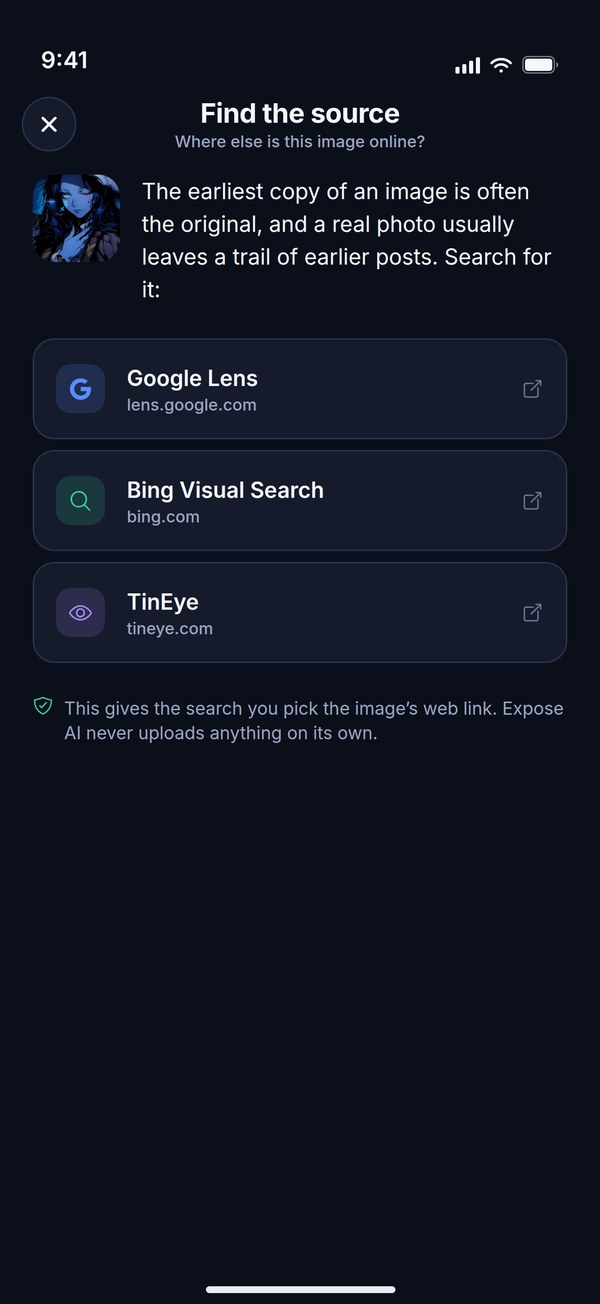
A verdict tells you what a picture is. Where else it appears tells you who is using it. From any result, tap Find the source to look the image up on Google Lens, Bing or TinEye — and see where it was first posted, or whether that "new" photo is years old.
- Google Lens, Bing or TinEye, one tap each, in your browser.
- An image from a link goes by its public web address — no file leaves your phone.
- Any other image goes through the share sheet, so you choose the search app it goes to.
- Opt-in, and never through us. Nothing is looked up unless you tap it.
Look it up later. Share it now.
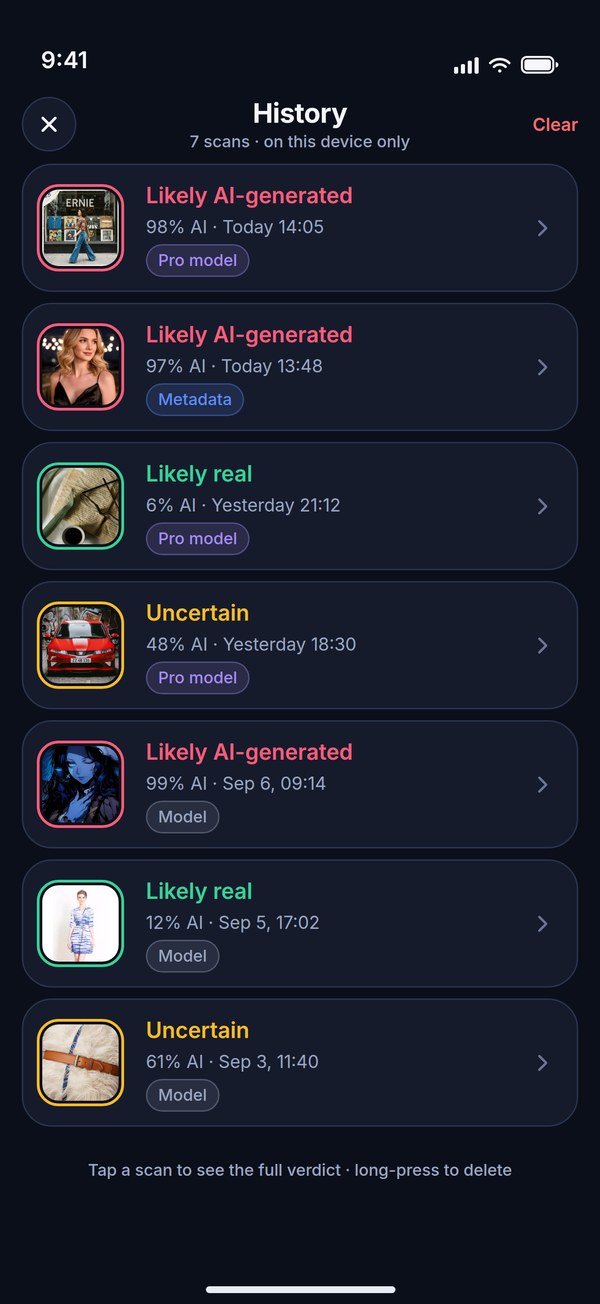
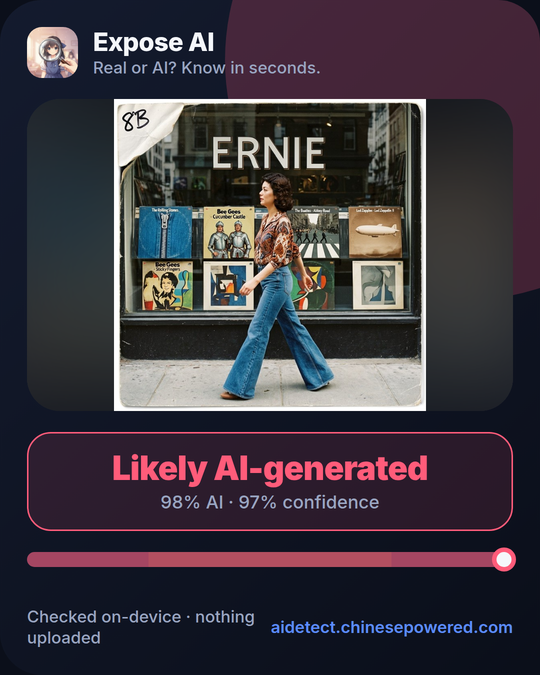
Every verdict lands in a private history on your phone — the thumbnail, the score, the scan type — so you can find that suspicious listing again next week. And when a picture needs exposing, one tap turns the verdict into a card you can send anywhere.
- History stays on your device. Never uploaded, never synced. Pause it or clear it in Settings.
- Filter by AI, Real or Uncertain and tap any past scan to reopen the full breakdown.
- A shareable verdict card with the image, the call, the AI score and the confidence — no ads, no clutter.
- PDF reports with Pro — the image, verdict, scores, per-region scores, evidence, source link and the file's SHA-256 fingerprint, to save or send.
Small app. Straight answers.
A handful of screens, start to finish — in English, Español, Português, Deutsch, Français or 日本語. No feed, no sign-in wall.
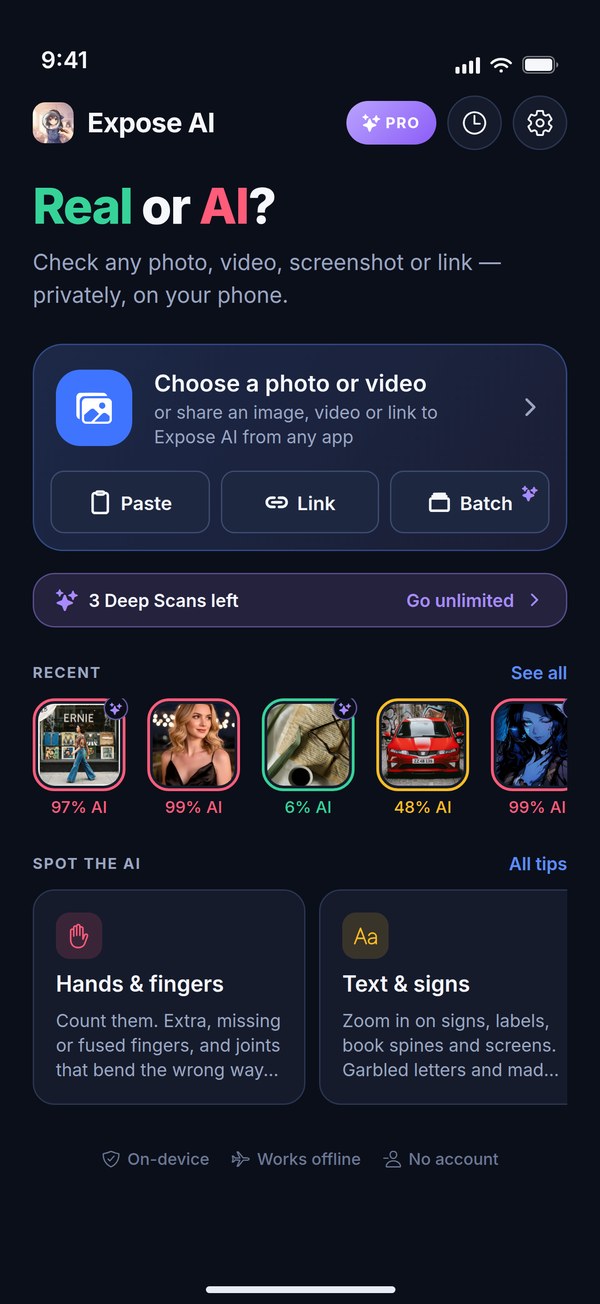
Start anywhere
Choose a photo or video, paste, check a link or start a batch. Your free Deep Scans are counted right there.
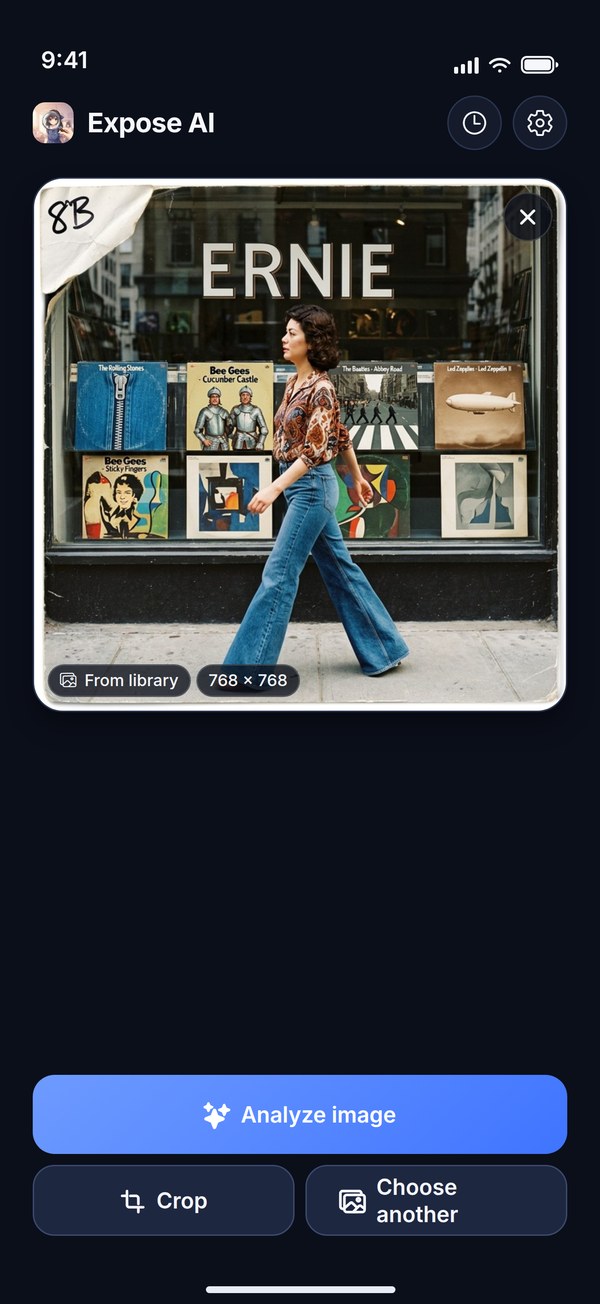
Standard or Deep
One fast model, unlimited — or a Deep Scan: two models, 12 views and a region scan.
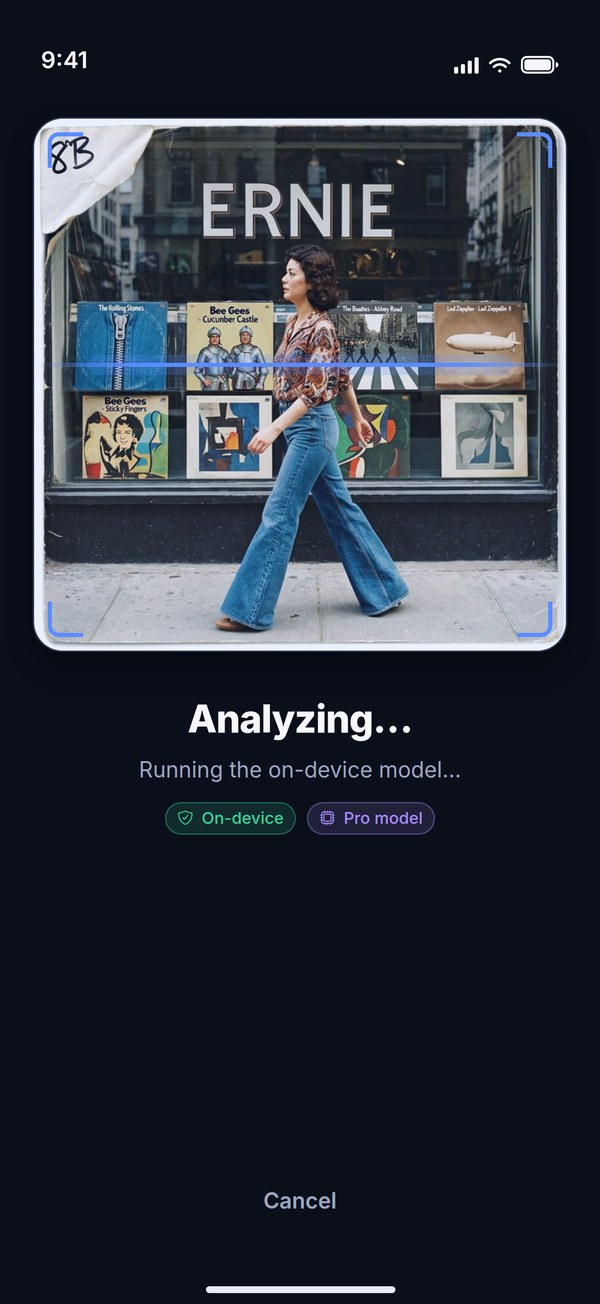
Analyzing
Entirely on the phone, every step shown. Cancel any time.
The verdict
A 0–100% AI gauge, the call in plain words, and how confident it is.
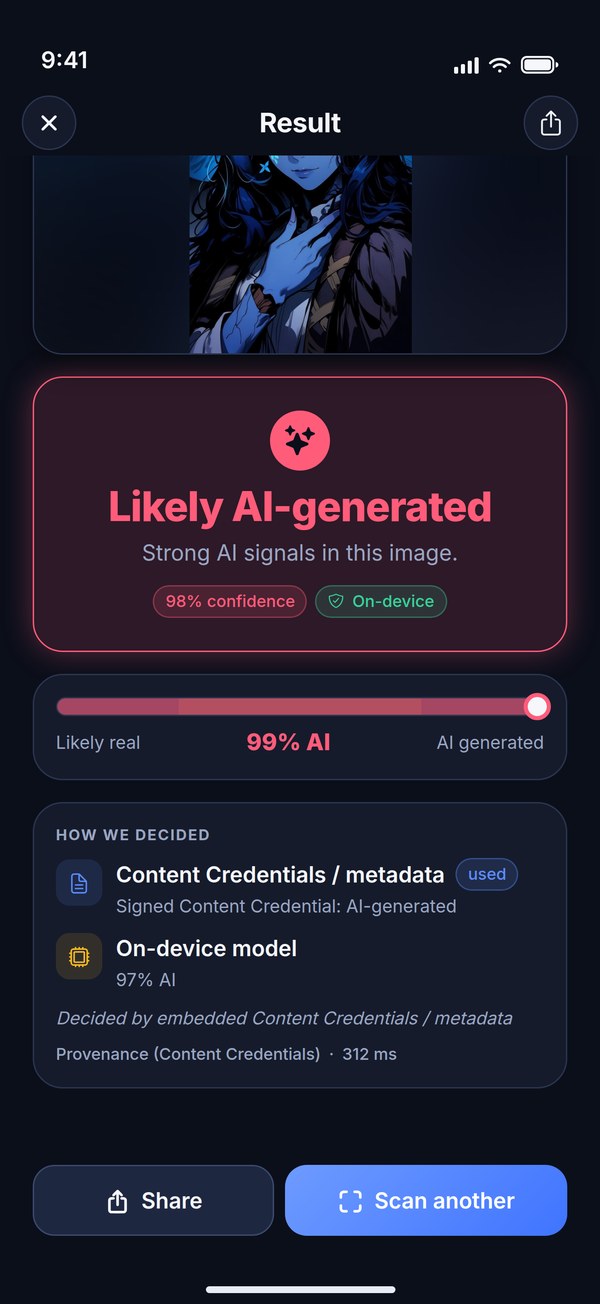
How we decided
Every signal, and which one made the call — here, a signed Content Credential from Adobe Firefly.
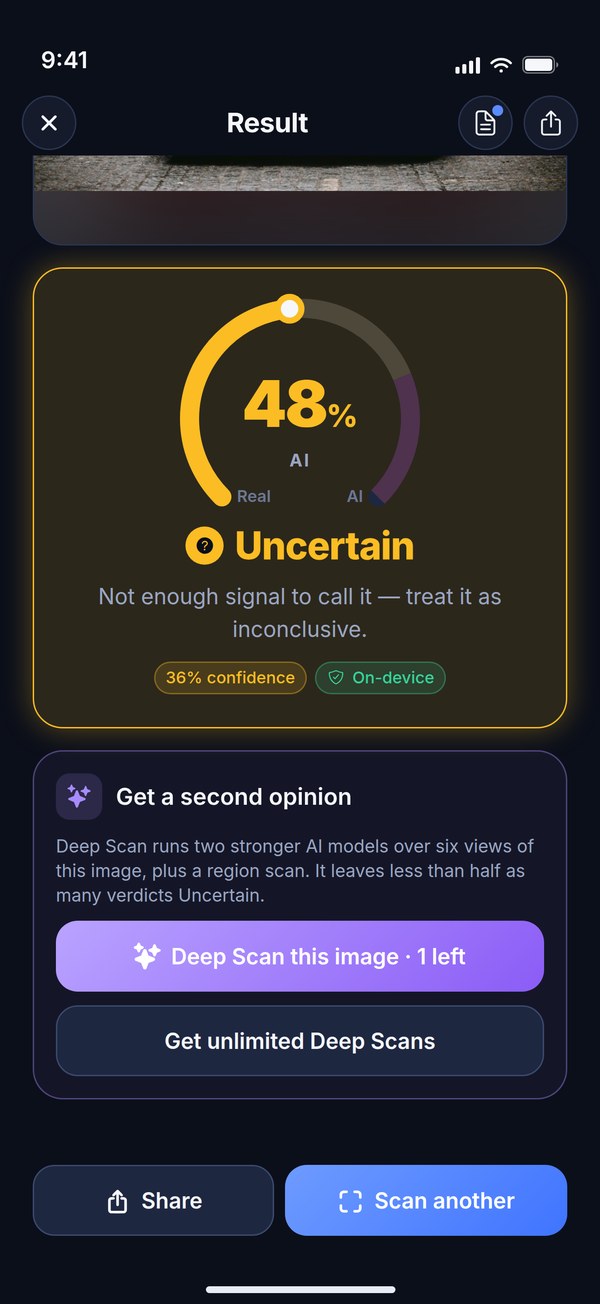
Uncertain? Ask again
It says so instead of guessing — then offers a Deep Scan of the same image.
Videos & GIFs
A few frames from across the clip, each checked like a photo, and one verdict for the whole thing.
Find the source
Where else is this image online? Look it up on Google Lens, Bing or TinEye.
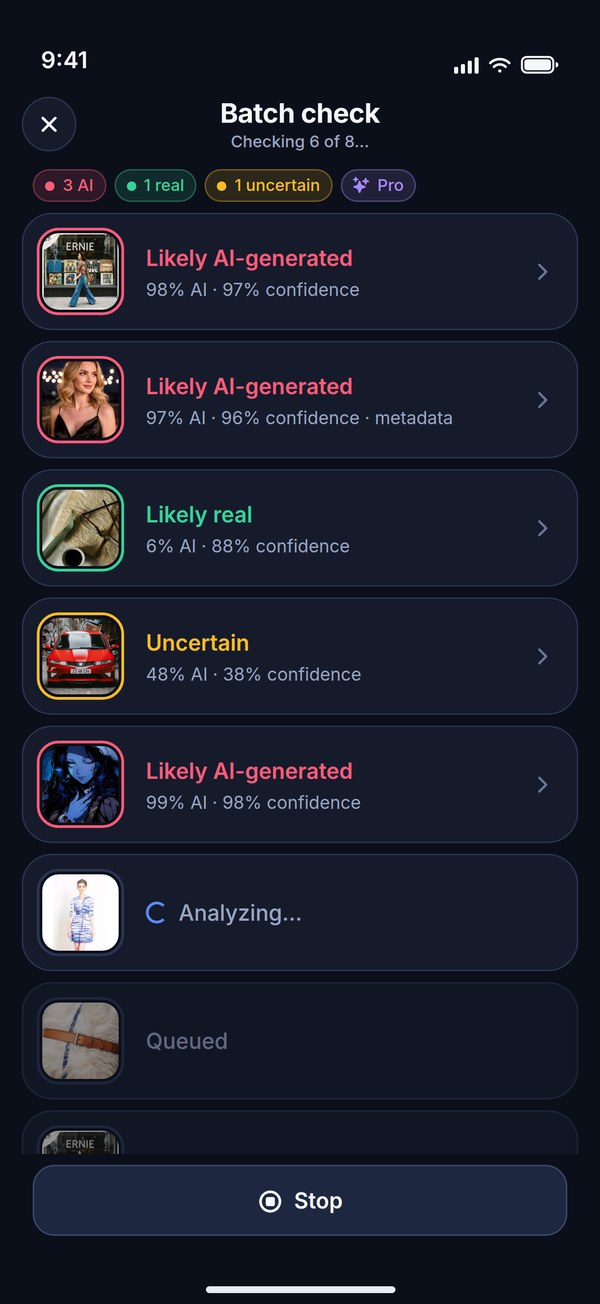
Batch check (Pro)
Pick a whole listing or profile — up to 12 images — and get a verdict for each.
History
Every past verdict, on your phone only. Filter it, reopen any scan, or clear it all.
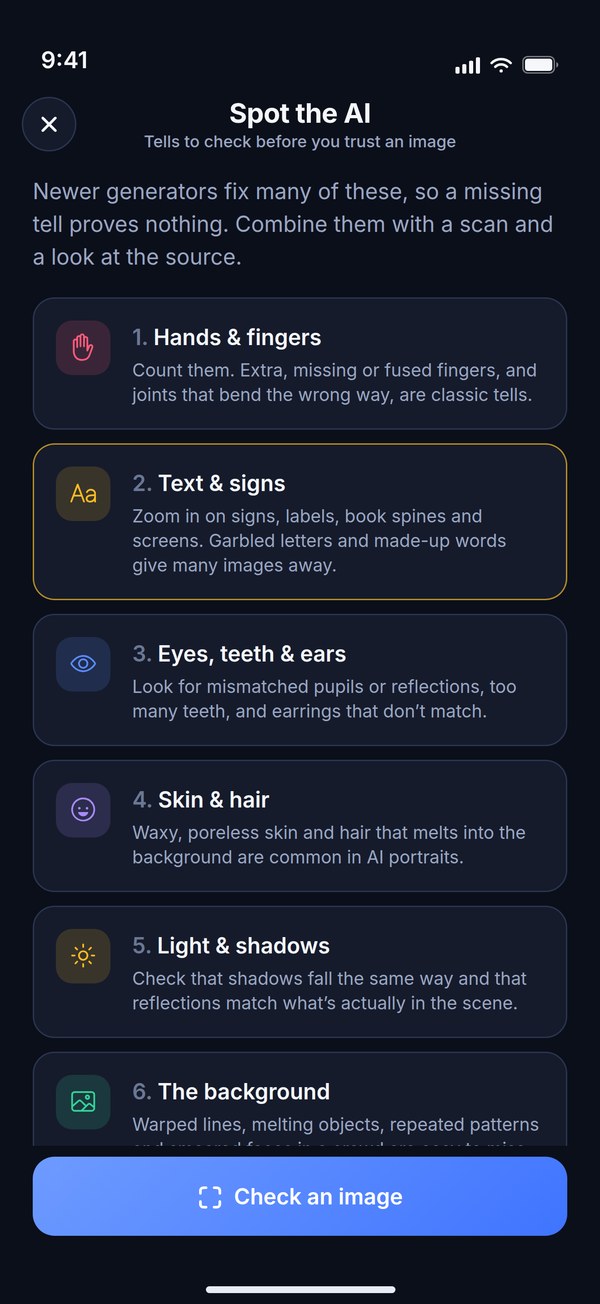
Spot the AI
Ten tells to check, from hands and text to light, physics, the source and Content Credentials.
A signal, not proof.
AI-image detection is probabilistic. So Expose AI tells you how confident it is, says Uncertain instead of guessing when the signal is weak, and shows which signal decided — and asks you to use it as one tool among several, never as the final word about a picture or a person.
How often a verdict comes back Uncertain, measured on 12,627 test images: 28% with a Standard scan, about 10% with a Deep Scan.
- Hands & fingers
- Text & signs
- Eyes, teeth & ears
- Skin & hair
- Light & shadows
- The background
- Geometry & physics
- “Too perfect”
- The source
- Content Credentials
The field guide inside the app. Newer generators fix many of these, so a missing tell proves nothing.
- Heavy compressionRe-saved, re-posted, messaging-app copies lose the fine texture the models read.
- Web copiesA link fetches the site's copy, usually recompressed. The original file gives the most reliable verdict.
- Screenshots of screenshotsApp UI around the picture confuses things — that's what Crop is for.
- Brand-new generatorsA model learns from what exists. A generator released yesterday may slip through.
- Stripped or spoofed metadataContent Credentials can be removed or faked, so the metadata pass is never the only pass.
- AI videoVideos are judged by their frames, so the newest AI video generators can slip through.
- Smooth close-upsSkin, fabric or sky can run hot on the region map. Read the map with the verdict.
Free to use. Pro sharpens the call.
Free
$0Unlimited Standard scans, supported by a small banner ad — plus free Deep Scans to try.
- 3 free Deep Scans to start
- One more for each short ad — only if you choose to watch (up to 3 a day)
- Videos & GIFs, checked frame by frame
- Every way in: photos, videos, paste, links and share
- 100% on your device
Pro
Weekly · Annual · LifetimeEvery scan becomes a Deep Scan, and every ad is gone. Still 100% on your device.
- Unlimited Deep Scans — less than half as many Uncertain verdicts
- The region map on every scan
- A Deep Scan on every video frame
- Batch check: up to 12 images at once
- PDF reports of any verdict
- No banner, no interruptions
US prices — the app shows the exact price in your local currency before you confirm. Subscriptions renew automatically; cancel anytime in your App Store or Google Play settings. Restore purchases any time.
The short answers.
Are my photos uploaded anywhere?
Never. Every scan — photos, videos and GIFs alike — runs 100% on your device, using models that ship inside the app. Your images are not sent to any server, and scans work fully offline. Two features go online, and only when you use them: Check a link fetches the page or image straight from the site you entered, like a browser would; and Find the source opens the search service you pick with the image's public link, or hands the image to the search app you choose in the share sheet. Nothing is ever sent to us.
How accurate is it?
AI-image detection is probabilistic — treat results as a strong signal, not proof. Every verdict comes with a confidence score, and the app says Uncertain rather than guessing when the signal is weak. Heavily edited, compressed or screenshotted images are harder to judge, and brand-new generators can slip through.
How does detection work?
First, a fast read of embedded Content Credentials (C2PA), XMP and AI-generator tags: a signed or credible AI claim there decides on its own. Otherwise the on-device models decide — one fast model in a Standard scan, or two stronger models over six views each in a Deep Scan. The result screen's How we decided card shows which signal made the call.
What is a Deep Scan?
The most thorough check in the app: two stronger AI models — one based on SigLIP2, one on TinyCLIP — each look at six views of the image, 12 in all, plus a region scan. It leaves less than half as many verdicts Uncertain: on 12,627 test images, about 10% came back Uncertain with a Deep Scan, versus 28% with a Standard scan. Like every scan, it runs on your phone.
What is the region map?
Part of every Deep Scan. The image is split into nine overlapping regions, each checked on its own, and a heat map over the photo shows where the AI signal is, from green through amber to red. It helps spot AI-edited or pasted areas in otherwise real photos. Each region is blended with the whole-image score to avoid false hot spots, and the map is shown together with the verdict — an aid, not proof on its own.
What can I check?
Photos, saved images, screenshots and videos from your library; an image or a link you've copied, via Paste; a link to a post, article or image; animated GIFs; or anything you share to Expose AI from another app — images, videos and web pages alike. Use Crop to isolate the picture inside a screenshot.
Can I check a link or an X post?
Yes. Tap Link, or paste or share it — X (Twitter) posts, Reddit, news sites, blogs and direct image links all work. Your phone opens the page directly, like a browser would (X posts are read through X's public embed endpoint), finds the image and checks it on-device. If a post has several images, you pick one. Private or login-only pages may not work. Nothing is sent to us.
Can it check videos and GIFs?
Yes. Choose a video from your library, share one from another app, or open an animated GIF: Expose AI takes 4 to 8 frames from across the clip — about one every two seconds — and checks each like a photo, with the Standard model on the free plan or a Deep Scan on every frame with Pro. You get one verdict for the whole clip, and each frame's verdict underneath. It works best on AI images turned into video; the newest AI video generators can slip through. It all runs on your phone.
Can it find where an image came from?
Yes: tap Find the source under What to do next on any result. For an image from a link, pick Google Lens, Bing or TinEye, and it opens in your browser with the image's public web address. For other images, the share sheet opens so you can choose a search app, such as Google. Nothing is looked up unless you tap it, and nothing goes through us.
Is it free?
Yes. Standard scans are free and unlimited — videos and GIFs included — supported by a small banner ad. You also get 3 free Deep Scans to start, plus one more each time you choose to watch a short ad (up to 3 a day). Pro makes every scan a Deep Scan and removes all ads: $3.99 a week, $29.99 a year, or $49.99 once for Lifetime. Those are US prices; the app shows your local price before you confirm.
What does Pro add?
Every scan becomes a Deep Scan — unlimited, with the region map on every result and a Deep Scan on every frame of a video. Pro also adds batch check (up to 12 images at once) and PDF reports, and removes every ad. Nothing changes about privacy: every model runs on your phone.
What if the verdict is Uncertain?
Uncertain means the scan didn't find enough signal to call it — the app says so instead of guessing. After a Standard scan, you can run a Deep Scan on the same image for a second opinion: use a free one if you have one left, watch a short optional ad for another, or go Pro for unlimited Deep Scans. Cropping to just the picture, or finding a higher-quality copy, helps too.
Where is my scan history stored?
Only on your phone. History keeps a small thumbnail and the verdict for each scan in the app's private storage — never uploaded, never synced. Filter it by AI, Real or Uncertain, and pause it or clear it any time in Settings; uninstalling removes it.
Does it catch face-swaps and AI edits?
Expose AI targets AI-generated and AI-edited images, including face-swapped and fully synthetic photos, and a Deep Scan's region map can point to an edited or pasted area inside an otherwise real photo. Videos are judged by their frames, so AI images turned into video are caught best, and the newest AI video generators can slip through.
Which languages does it support?
Six: English, Español, Português, Deutsch, Français and 日本語. The app follows your phone's language setting.
Do I need an account?
No sign-up, no login, no account. The app doesn't even ask for photo-library permission: the system picker hands it only the one photo or video you tap.
Does it work offline?
Yes. The models are bundled in the app, so scans work in airplane mode — videos and GIFs too. Checking a link needs a connection, since it downloads from the site you give it — and so do Find the source, ads and the Pro purchase.
Real or AI?
Know in seconds.
Free. No account. Every scan stays on your phone.